

 RawPrint
Windows command line tool to print
UTF-8 file based PrintStreams via TCP
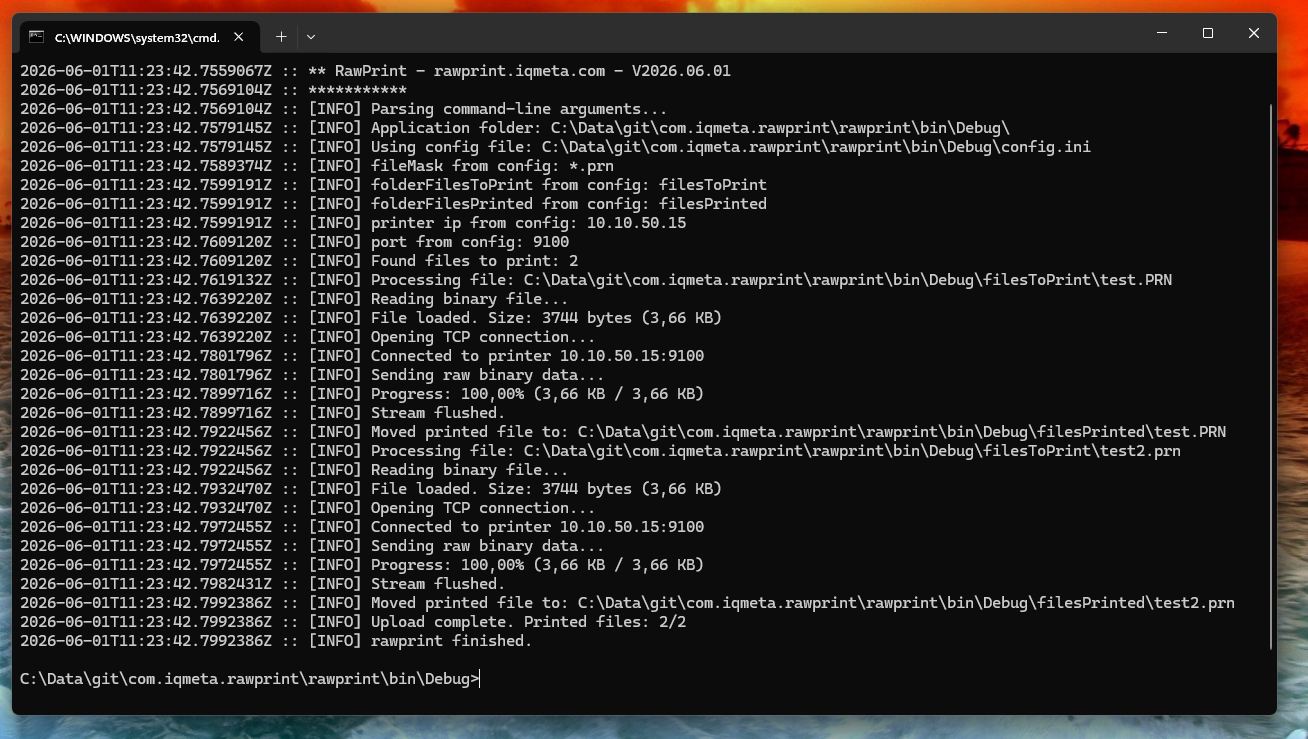
Easy config with old-school .ini • Batch print stream files (like *.prn/*.bin) via Folder • Printed files are automatically moved to an archive folder • Debug Logging •
Ready to use as Windows Service with NSSM
Freeware / MIT License
Requirements: Windows with .NET 4.8.1 Framework
Our new platform for ZPL Label lovers
Print anywhere. Manage from the cloud.
The new home for ZPL lovers — where raw printing is just a very little part of it.
Download & Usage
Download the latest release, extract it, and start printing. No installation required.
Usage: rawprint.exe [config.ini]
If no argument is provided, 'config.ini' is used by default.

[config.ini]
fileMask=*.prn
folderFilesToPrint=filesToPrint
folderFilesPrinted=filesPrinted
archivePrintedFiles=true
printerIp=10.10.50.15
tcpPort=9100
printDebugLog=printLog.txt
printDebugEnabled=true
runAsServiceWatcher=true
intervalSecondsCheckFilesToPrint=15
Use as Windows Service
Run RawPrint as a background Windows service so it starts automatically on boot and keeps printing even when no user is logged in. This is done using NSSM — the Non-Sucking Service Manager.
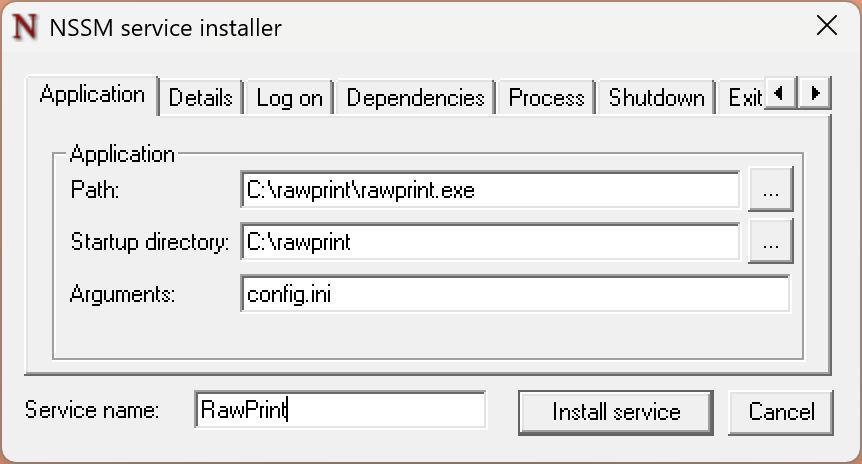
1. Download NSSM from https://nssm.cc/download

2. Open an admin terminal, goto folder where nssm was extracted and run:
   nssm install RawPrint

3. In the NSSM GUI that opens, set:
   - Path:           C:\rawPrintPath\rawprint.exe
   - Startup dir:    C:\rawPrintPath
   - Arguments:      config.ini

4. Click "Install service"

5. Start the service:
   nssm start RawPrint

6. If log is enabled you can check for updates each run

To remove the service later:
   nssm stop RawPrint
   nssm remove RawPrint
MIT License
RawPrint is released under the MIT License — a permissive, freeware license. You are free to use, modify, and distribute this software in any project, commercial or otherwise, as long as the original copyright notice is included.
Copyright (c) 2026 iqmeta GmbH

Permission is hereby granted, free of charge, to any person obtaining a copy of
this software and associated documentation files (the "Software"), to deal in
the Software without restriction, including without limitation the rights to
use, copy, modify, merge, publish, distribute, sublicense, and/or sell copies
of the Software, and to permit persons to whom the Software is furnished to do
so, subject to the following conditions:

The above copyright notice and this permission notice shall be included in all
copies or substantial portions of the Software.

THE SOFTWARE IS PROVIDED "AS IS", WITHOUT WARRANTY OF ANY KIND, EXPRESS OR
IMPLIED, INCLUDING BUT NOT LIMITED TO THE WARRANTIES OF MERCHANTABILITY,
FITNESS FOR A PARTICULAR PURPOSE AND NONINFRINGEMENT. IN NO EVENT SHALL THE
AUTHORS OR COPYRIGHT HOLDERS BE LIABLE FOR ANY CLAIM, DAMAGES OR OTHER
LIABILITY, WHETHER IN AN ACTION OF CONTRACT, TORT OR OTHERWISE, ARISING FROM,
OUT OF OR IN CONNECTION WITH THE SOFTWARE OR THE USE OR OTHER DEALINGS IN THE
SOFTWARE.
Need Help?
Reach out to us for feature request, bugs or any questions regarding RawPrint. We will do our best to assist you, but please note that support is provided on a best-effort basis.
There is no entitlement to support. The software/service is provided as-is, without any guarantee of assistance, updates, or fixes.
Copyright © 2026 iqmeta GmbH. All rights reserved.
Developed with ♥ by iqmeta GmbH - Legal Notice